How instruction files evolved from a single paragraph to a complete multi-agent system through human-AI collaboration.
The Premise
You don’t need to write perfect instructions upfront. Start with a simple goal, collaborate with your AI agent, and let the workflow emerge through iteration. Each problem you solve becomes a building block for the next.
The Full Evolution: Git Tells the Story
This is a real project. Here’s how the instruction files evolved over time, commit by commit.
Phase 1: The Beginning - A Simple CLAUDE.md
Commit: 5a9496e Phase 1: Project Setup
The first CLAUDE.md was just a few lines:
# Project Name
This is a project of an obsidian plugin to enable
communication with claude shell from obsidian.

# Project Purpose
To make it easier to send commands from obsidian to shell
and responses from shell to obsidian directly.

# Features:
## Obsidian to claude shell communication
As a user inside obsidian I can use shortcut to open up a modal...
That’s it. No rules. No workflow. Just “here’s what we’re building.”
Phase 1.5: The Agent Builds Everything (10 Phases!)
With just that simple description, the agent built the entire plugin:
5a9496e Phase 1: Project Setup - Bootstrap configuration
28f6917 Phase 2: Type Definitions and Utilities
ab766fb Phase 3: Process Management Implementation
146716c Phase 4: Session Management Implementation
e97ec46 Phase 5: UI Session Selection Implementation
10dfc3f Phase 6: UI Command & Response Implementation
2d8cebd Phase 7: Plugin Integration - Complete Workflow
03e2d87 Fix TypeScript errors in main.ts
887e245 Phase 8: Polish & Error Handling
55bd3ab Phase 9: Documentation
0554ea7 Phase 10: Testing Guide
10 phases of implementation from a 20-line instruction file. The agent created:
- TypeScript types and utilities
- Process management for spawning Claude CLI
- Session management
- UI modals and components
- Full plugin integration
- Documentation and testing guides
No detailed specs. Just “build this plugin” and iterative collaboration.
Phase 1.6: The Bug That Changed Everything
Commit: 967137c Fix command timeout by switching to claude --print mode
Then came a bug: commands were timing out after 30 seconds. The agent diagnosed the root cause (interactive mode doesn’t work with pipes) and… completely refactored the architecture:
Root Cause:
Interactive Claude mode doesn't output to stdout when spawned with pipes.
It expects a real terminal, causing commands to timeout after 30 seconds.

Solution:
- Refactored ClaudeProcess to spawn fresh `claude --print` for each command
- Removed long-running process architecture in favor of ephemeral processes
- Simplified codebase by removing interactive mode complexity

Changes:
- process-manager.ts: Complete refactor of ClaudeProcess class
  - Removed long-running process state
  - Removed obsolete methods (handleOutput, handleError, handleExit...)
  - Simplified to single-command spawning

 src/process-manager.ts | 346 +++++++++--------------------------------------
 2 files changed, 97 insertions(+), 253 deletions(-)
253 lines deleted. Major architectural change. No approval asked.
The fix worked. But the human realized: the agent just made a massive change without presenting a plan first. What if the change had been wrong?
Phase 2: First Friction - “Always Present Plan First”
Commit: c8b02be Add critical reminder to always present plan before implementation
The very next commit added guardrails:
## CRITICAL: Always Present Plan Before Implementation

**STOP AND PRESENT A PLAN FIRST - DO NOT START CODING WITHOUT USER APPROVAL**

When the user asks you to implement something, you MUST:
1. **STOP** - Do not start writing code immediately
2. **ANALYZE** - Understand the full scope
3. **PLAN** - Create a detailed plan
4. **PRESENT** - Show the plan and ask for approval
5. **WAIT** - Wait for explicit approval
6. **IMPLEMENT** - Only after approval, proceed
The lesson: Rules emerge from friction. The agent did something wrong, the human corrected it, and the correction became a permanent instruction.
Phase 3: Testing Rules Get Practical
Commit: 7da8245 Make testing guidelines more practical and pragmatic
Initially, the rule was “always add unit tests.” After discussion:
## Unit Testing Guidelines

**DO write tests for:**
- Pure utility functions (easy to test, high value)
- Complex business logic
- Critical bug fixes

**DON'T write tests for:**
- Simple getters/setters
- UI/modal code (hard to test, low value)
- Prototype/exploratory code
Human said: “it doesn’t make sense to always add unit tests” — rule updated.
Phase 3.5: Codebase Analysis - Agent Finds Issues
Before spawning multiple agents, we needed issues for them to work on.
Human: “Analyze the codebase for memory leaks and potential issues”
The agent systematically reviewed the code and created 10 GitHub issues:
#7  Memory leak: Skill button event listeners not cleaned up
#8  Memory leak: requestAnimationFrame not cancelled on prompt close
#9  Memory leak: Modal button event listeners not cleaned up
#10 Timer leak: Command timeout not cleared when process is killed
#11 Memory leak: Orphaned requests not cleaned up
#12 Event leak: Status bar click listener not removed on destroy
#13 Timer leak: Copy button setTimeout not cleared on modal close
#14 Performance: Skill loading is synchronous and not optimized
#15 Enhancement: Add request deduplication
#16 Performance: Tag search bounds hardcoded
Each issue had:
- Description of the problem
- Exact file and line number
- Risk assessment
- Suggested fix
This became the backlog for parallel agents to tackle.
Phase 4: Multi-Agent System Emerges
Commit: f84d0c7 new instruction for issues
With 10 issues ready, we wanted multiple agents working in parallel. Two new files appeared:
# AGENT_ISSUES.md

You are an agent assigned to work on a GitHub issue.

## Your Workflow
1. Read the issue carefully
2. Create a feature branch
3. Implement the fix
4. Run tests
5. Create a PR
# AGENT_MANAGER.md

You are a manager agent. Your job is to:
1. Pick 3 issues from the backlog
2. Spawn 3 Claude agents in tmux panes
3. Send each agent their instructions
4. Monitor progress via PR creation
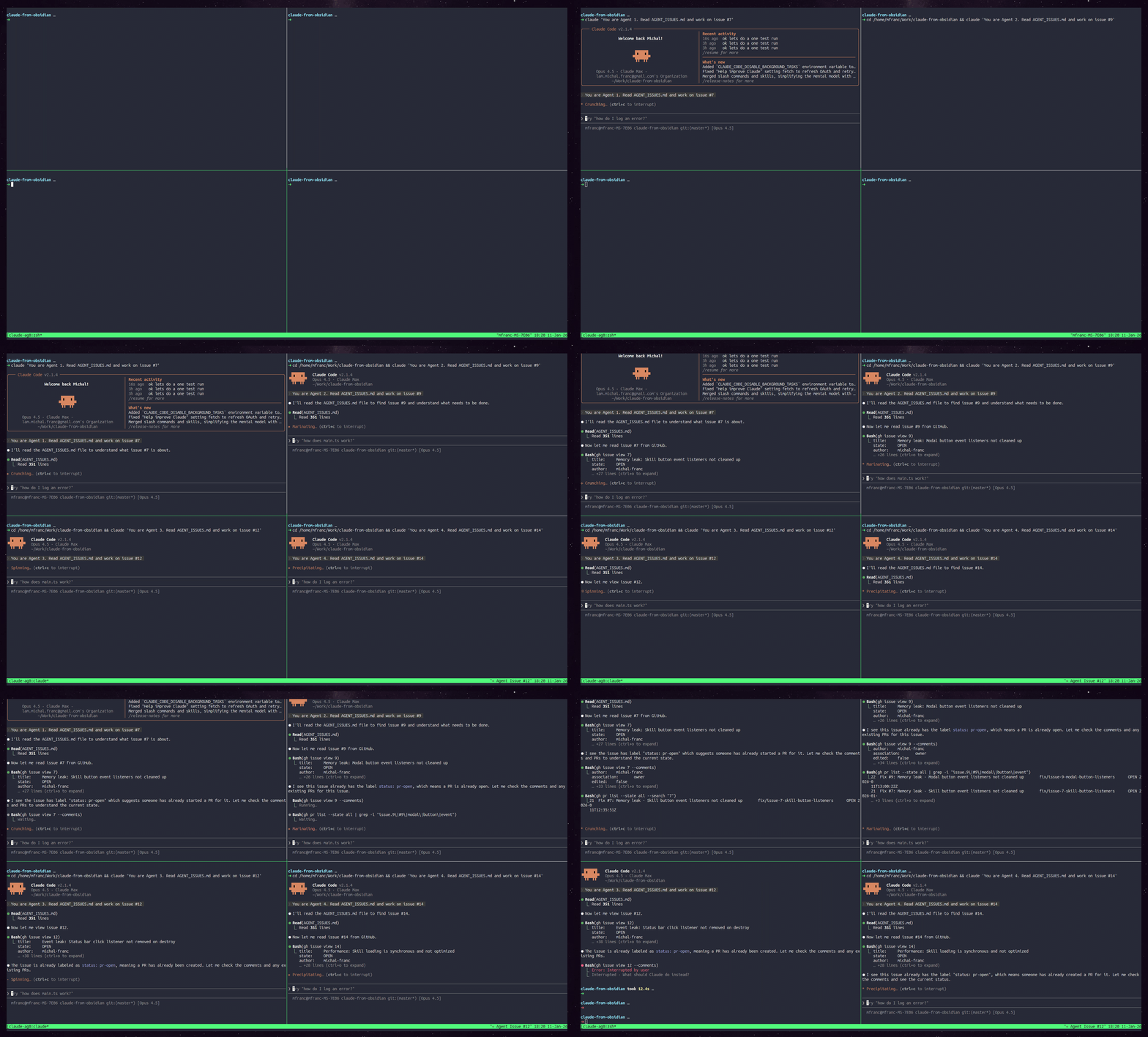
The manager used tmux to spawn parallel agents:
# Create tmux session with 3 panes
tmux new-session -d -s claude-agents
tmux split-window -h
tmux split-window -v
tmux select-layout tiled

# Send instructions to each pane
tmux send-keys -t claude-agents:0.0 "claude" Enter
tmux send-keys -t claude-agents:0.0 "Work on issue #7..." Enter
Three agents working simultaneously, visible in tiled tmux panes on workspace “5: claude-agents”.
Why tmux works perfectly for multi-agent orchestration:
tmux’s send-keys command is the secret sauce here. It allows the manager agent to:
- Spawn agents programmatically - create sessions and panes from bash
- Send text to any pane - target specific panes with
-t session:window.pane - No special IPC needed - just send keystrokes like a human would type
- Visual monitoring - all agents visible in tiled layout, you can watch them work
- Session persistence - agents survive terminal disconnects
The manager doesn’t need complex inter-process communication. It just types instructions into terminal panes. Simple, debuggable, and you can manually intervene in any pane if needed.
Architecture:
                    ┌─────────────────────────────────────┐
                    │           MANAGER AGENT             │
                    │                                     │
                    │  1. Reads GitHub issues backlog     │
                    │  2. Selects issues to work on       │
                    │  3. Spawns worker agents via tmux   │
                    │  4. Monitors PRs for completion     │
                    └──────────────┬──────────────────────┘
                                   │
                    ┌──────────────┴──────────────┐
                    │      tmux send-keys          │
                    │   (spawn claude instances)   │
                    └──────────────┬──────────────┘
                                   │
        ┌──────────────────────────┼──────────────────────────┐
        │                          │                          │
        ▼                          ▼                          ▼
┌───────────────┐        ┌───────────────┐        ┌───────────────┐
│   AGENT 1     │        │   AGENT 2     │        │   AGENT 3     │
│   (pane 0)    │        │   (pane 1)    │        │   (pane 2)    │
│               │        │               │        │               │
│ Issue #7      │        │ Issue #9      │        │ Issue #12     │
│ Memory leak   │        │ Modal cleanup │        │ Status bar    │
│               │        │               │        │               │
│ ┌───────────┐ │        │ ┌───────────┐ │        │ ┌───────────┐ │
│ │ worktree  │ │        │ │ worktree  │ │        │ │ worktree  │ │
│ │ issue-7/  │ │        │ │ issue-9/  │ │        │ │ issue-12/ │ │
│ └───────────┘ │        │ └───────────┘ │        │ └───────────┘ │
└───────┬───────┘        └───────┬───────┘        └───────┬───────┘
        │                        │                        │
        ▼                        ▼                        ▼
   ┌─────────┐              ┌─────────┐              ┌─────────┐
   │  PR #21 │              │  PR #22 │              │  PR #20 │
   └─────────┘              └─────────┘              └─────────┘
Demo: Manager spawning 4 agents in tmux
Commit: 39b2b4d Add agent workflow documentation with git worktrees
Problem: Agents stepping on each other’s toes. Solution: git worktrees.
## Step 2: Create a worktree (IMPORTANT - prevents conflicts)
git worktree add ../claude-from-obsidian-issue-XX fix/issue-XX
cd ../claude-from-obsidian-issue-XX
Commit: 88630dc Add issue labeling workflow to AGENT_MANAGER.md
New file for the manager agent coordinating others:
# AGENT_MANAGER.md

## Label Workflow
1. Before assigning: add `status: ready` label
2. Agent picks up: changes to `status: in-progress`
3. PR created: changes to `status: pr-open`
Commit: b765852 Update agent instructions: agents update their own labels
After confusion about who updates labels:
**IMPORTANT:** Agents update their own labels, not the manager.
Phase 5: E2E Testing Framework
Commit: 11dec5a Add e2e testing framework with xdotool automation
A new instruction file and scripts emerged from a single question: “How can we do e2e testing?”
AGENT_E2E_TESTER.md
tests/e2e/scripts/
├── start-obsidian.sh
├── run-test.sh
├── cleanup.sh
└── deploy-plugin.sh
This didn’t exist in any plan. It emerged from trying to solve a problem.
The Screenshot Breakthrough
Mid-session, a throwaway idea became a key feature:
Human: “wait, can we take screenshots and put them in GitHub PR comments as proof?”
This led to integrating scrot (screenshot CLI tool) into the test pipeline:
# Take screenshot of focused window only, JPG format for smaller size
scrot -u -q 80 "/tmp/e2e-screenshots/test-$(date +%Y%m%d-%H%M%S).jpg"
The -u flag captures only the focused window (not all monitors), and -q 80 produces JPG at 80% quality—4x smaller than PNG.
Now every e2e test run produces visual evidence that gets uploaded to PR comments. Reviewers can see exactly what happened.
Testing Advice That Emerged
Through iteration, we learned what actually works for agent-driven e2e testing:
-
Always clean state first - Run cleanup before tests, not just after. Leftover state from previous runs will cause mysterious failures.
-
Use generous timeouts - Agents operate differently than humans. We started at 10s, ended at 40s. Obsidian startup, plugin loading, Claude processing—it all takes time.
-
Verify with file contents, not clipboard - Clipboard-based verification was flaky. Reading the actual file is reliable.
-
Rebase before testing PRs - PR branches diverge from master. E2e scripts might not exist on old branches. Always rebase first.
-
Git restore test fixtures - Test files get modified during tests. Add
git restoreto cleanup or tests pollute each other. -
Screenshots are documentation - They prove the test ran and show the exact state. Worth the extra 200KB per test.
The Evolution Timeline
Day 1: CLAUDE.md (20 lines)
       └── "here's what we're building"
       └── Agent builds entire plugin (10 phases!)
       └── Types, process mgmt, UI, docs - everything

Day 1-2: Bug found, agent refactors architecture
       └── 253 lines deleted without asking
       └── Fix worked, but...

Day 2: CLAUDE.md grows (100+ lines)
       └── + "CRITICAL: always present plan first"
       └── + "testing guidelines"
       └── + "git workflow"
       └── Guardrails emerge from friction

Day 3: AGENT_ISSUES.md appears
       └── "how agents work on issues"
       └── Multiple agents working in parallel

Day 3: AGENT_MANAGER.md appears
       └── "how to coordinate agents"
       └── + git worktrees (agents conflicted)
       └── + label workflow (status tracking)

Day 4: AGENT_E2E_TESTER.md appears
       └── "how to run e2e tests"
       └── + scripts crystallize from iteration
The E2E Testing Deep Dive
Let’s zoom into how one instruction file evolved in a single session.
It Started Simple
Human: “How can we do e2e testing for this plugin?”
Agent: Proposed xdotool to automate Obsidian. Created basic script.
Problems → Solutions → Instructions
| Problem | Human Said | Agent Did | Became Instruction |
|---|---|---|---|
| Sandbox error | - | Added --no-sandbox |
In start script |
| Wrong vault | “don’t test in my main vault” | Register vault in config | Python script |
| Full screen capture | “only main monitor” | scrot -u |
In run-test.sh |
| Big screenshots | “make them jpg” | Added -q 80 |
In run-test.sh |
| Test passed wrong | - | Fixed case-sensitive grep | In run-test.sh |
| Files not cleaned | “cleanup test files too” | Added git restore | In cleanup.sh |
| Timing issues | “increase to 40s” | Changed default | In run-test.sh |
Each row is a real conversation that became a permanent fix.
The Result
# What started as "let's test this" became:
./tests/e2e/scripts/start-obsidian.sh  # 85 lines
./tests/e2e/scripts/run-test.sh        # 110 lines
./tests/e2e/scripts/cleanup.sh         # 47 lines
./AGENT_E2E_TESTER.md                  # 211 lines
Key Insights
1. A Simple Instruction File Can Build a Lot
From a 20-line CLAUDE.md, the agent built:
- 10 implementation phases
- Full TypeScript plugin architecture
- Process management, UI, documentation
You don’t need detailed specs. Start simple, iterate.
2. Instructions Are Bug Reports in Disguise
Every rule in CLAUDE.md started as something that went wrong:
- Agent refactored 253 lines without asking → “ALWAYS present plan first”
- Tests for everything → “DON’T test UI code”
- Agents conflicted → “Use git worktrees”
The “always present plan first” rule came from a successful fix that scared the human. What if it had been wrong?
3. The Human Role: Direction + Correction
Real quotes from the session:
- “it opened my main vault - I don’t want that”
- “wait, why do we need this python script?”
- “always start from the beginning”
- “can you make screenshots only from main monitor?”
Short, specific corrections. Not specs—reactions.
4. Small Fixes Compound
scrot           → scrot -u        → scrot -u -q 80
10s timeout     → 20s             → 40s
grep -qi        → grep -q
None planned. All discovered.
5. Use It For Real to Find Gaps
We used e2e tests on actual PRs. This revealed:
- Need to rebase branches first
- Screenshots as proof in comments
- Cleanup must restore test files
Would never have found these without real use.
The Pattern
┌─────────────────────────────────────────────────────┐
│  1. Start with simple instruction file              │
│     CLAUDE.md: "here's what we're building"         │
├─────────────────────────────────────────────────────┤
│  2. Work together, hit friction                     │
│     Agent does something wrong/suboptimal           │
├─────────────────────────────────────────────────────┤
│  3. Human corrects with short feedback              │
│     "don't do X" / "always do Y"                    │
├─────────────────────────────────────────────────────┤
│  4. Agent implements fix + documents it             │
│     Rule added to instruction file                  │
├─────────────────────────────────────────────────────┤
│  5. New capability needed → new file emerges        │
│     AGENT_ISSUES.md, AGENT_MANAGER.md, etc.         │
├─────────────────────────────────────────────────────┤
│  6. Repeat until workflow stabilizes                │
│     Instructions = accumulated wisdom               │
└─────────────────────────────────────────────────────┘
The Takeaway
Your agent instruction files should be living documents that grow from collaboration, not waterfall specs written upfront.
Start with one file. One paragraph. Work together. Let the instructions emerge.
The best agent workflows are the ones that evolved from actually doing the work.
BIG GOTCHAS:
- analysis of issues found issues but not real issues - claude was missing the point and wanted to add ifxes for memory leaks that were not that significant or interesting
Meta: This Article Was Published Using the Pattern
While writing this article, I used a /blog-finish skill to publish it. The conversation itself demonstrated the pattern:
The Exchange
Human: “what is the skill blog finish doing?”
Agent: Searches codebase, finds and reads SKILL.md, explains the skill
Human: “ok my blog is at /home/mfranc/Work/micha-franc.github.io can you run blog finish for post agentic-workflow-evolution and add it to my blog as a draft?”
Agent: Invokes skill, reads the post, checks for images, then…
ls /home/mfranc/Work/ | grep -i franc
# Output: michal-franc.github.io
The path the human gave (micha-franc) was wrong - missing the ‘l’ in michal. The agent discovered the correct path by listing the directory.
Human: Interrupted the file copy “ok before you do that add to the post - at the end log of our conversation here - of the mistakes i did”
What This Shows
-
Typos happen - The human misremembered the path. The agent recovered by checking what actually exists.
-
Skills need discovery - The
/blog-finishskill wasn’t in the agent’s initial “available skills” list. It had to be found by searching the.claude/skills/directory. -
Interruption is collaboration - The human stopped the agent mid-task to add this very section. The workflow adapted in real-time.
-
The pattern repeats - Even using a mature skill to publish an article about workflow evolution… led to workflow evolution.
This section you’re reading was added because the human wanted to capture the meta-moment.
Programming by Doing
Then the human said: “also update the skill with the knowledge you have gained here”
This is the key insight: the agent builds context through doing the task, then projects that context back into the skill itself.
Traditional programming: write code → run it → debug
Programming by doing: do the task → hit friction → update the instructions
The agent now knows:
- Blog paths can have typos - verify they exist before using
- Skills might not be in the available list - search
.claude/skills/directory - Posts might lack frontmatter - create it from the content
- Users interrupt with good ideas - adapt the workflow
This knowledge gets projected into the skill file. The next time someone runs /blog-finish, it will:
- Verify the blog directory exists and suggest corrections
- Handle missing frontmatter gracefully
- Document what it learned
The skill improves not because someone wrote a spec, but because someone used it and the friction became code.
This is programming by doing. The conversation is the development process.
Built from real git history and conversation transcripts. Project: claude-from-obsidian.