
The era of personal software?
This year’s start has been interesting. I’ve been building a lot of stuff lately, thanks to Claude Code. Usually small things - scripts, automations, little tools for my Linux setup. Not production-ready software, mostly vibe coded, or well, now it is called “gen coded.” The itch comes mostly from the need to experience as much of Claude Code and agentic coding as possible, and ideally to spot breaking points and moments where it no longer makes sense.
I need to build this experience and intuition to have an opinion on what will happen in the next 2-3 years. These days, my role at companies I work with is typically centered around long-term vision and strategy for multiple engineering teams - so I need to understand and experience what the future might look like. It is really important. You can read my 2026+ prediction for Software Engineers in IT here - Software Engineering Transformation 2026 | Michal Franc
So I have been thinking recently: are we entering a new era of personalized software? Apps that aren’t polished, aren’t fully reliable, but apps you can just… write for yourself, maybe self-host them? This might even expand toward communities of developers building bespoke solutions for their group. Or maybe it will go even further, and coding/programming will become a social activity - something people just do for fun to relax?
Personally, one of the things I built recently was a speech-to-text integration. A tool that I could use to dictate text and have it flow into whatever I was working on - notes, code, messages. And then to also dictate commands to Claude itself, from my watch, while away from my desk.
So I wanted a Superwhisper but on Linux
I have been using a lot of dictation on Mac - it kind of works - it’s not as good as new models or tools for STT (Speech to text), but it was kind of good enough. I also stumbled upon Superwhisper which is a similar app that uses new STT models and makes the whole experience much better and much more accurate. But on my personal machine I work on Linux and there is no support yet in SuperWhisper for Linux… So I decided to build something similar for myself, a personal software. Plus this was also a great opportunity on how far ahead I can go with gen coding.
The core requirements I need:
- Press a key - start dictating
- Text appears in the active window as I speak (streaming, not batch)
- Works everywhere - terminal, browser, Obsidian, whatever
- Bonus: pipe the text to Claude for quick commands
- Bonus: integrate with polybar and i3 events to show dictation status
The “pipe to Claude” part came from how I use my notes. I have a 2nd brain setup in Obsidian, and I often want to do things like “find that note about X and add this thought to it.” Typing that out breaks the flow. Dictating it? Much better.
The Project
Link - GitHub - michal-franc/toadie-personal-assistant
Star if you like it - though I am not sure its ready to be used by someone else - like I mentioned it is a personal software.
Open Source vs Personal Software
Maybe we’re about to see a new kind of software, stuff built by someone purely for themselves, with no intention for someone else to use it? Just a thing that works for the person who made it. I was thinking about open source as something that other people will use. So you write docs, you think about edge cases. Personal software is not concerned with that. It only has to work on your machine, for your workflow, with your weird preferences baked right in.
With gen coding making it much easier to create things, I think we’re going to see a lot of new types of open source projects.
Dictation script
I started simple, emulation of dictation experience like on Mac. Capture audio from the microphone, send it to Deepgram for transcription, and stream the resulting text directly into the focus area. The code is just Python orchestrating audio capture, API call and usage of xdotool - nothing special really.

Before deciding on using Deepgram API I have tested - Whisper local model, Google Cloud STT, more on the decision why Deepgram later.
These services charge by the minute (apart from Whisper which is local), and it can be expensive if you leave the stream running. It was important to build in some protections to avoid that.
- Auto-stop after silence - script exits after 10 seconds of no speech, in case I forget to turn it off
- Crontab - every 5 minutes, kills all processes associated with dictation, in case there’s a bug in auto-stop
- Polybar integration - shows whether dictation is on or off - so me as a user I can also make a decision to disable it.
Dictate to Claude code instance
Dictating to the active window is great, but sometimes I just wanted to talk to Claude ASAP. Press a button, say something, and have it land in Claude Code process. So I wrote another script that handles this. When triggered, it spawns a Claude Code instance in my i3 setup and pipes the transcribed text directly into it. It’s especially nice when I’m away from the desk and just want to fire off a quick thought or command through my headphones microphone.

Dictate to long running Claude session
The above solution was simple but had a flaw that on each hotkey press a new Claude process was started, with new context. When working with Claude, I often have long running sessions, and I wanted to speak into that existing context rather than starting a new one all the time.
This is where tmux and its send-keys command helped. I run my Claude CLI inside tmux with a specific name, so I can target it from the script. When I finish dictating, the transcript gets piped to the specific Claude process using tmux send-keys -t session:pane.

The problem with this approach was that I still had to be available at my desk for various permission prompts - but more on a solution to this later.
Galaxy watch integration
This solution was pretty good and covered most of my requirements but then one night, just before the sleep, my brain decided to start thinking about ideas. So I have a Galaxy Watch… it has a microphone… it can record audio… why not use it for talking to Claude from my watch?
So I have built a custom Kotlin app for wear os. Little mockup of the app below - just to visualize it - it looks a bit differently now.
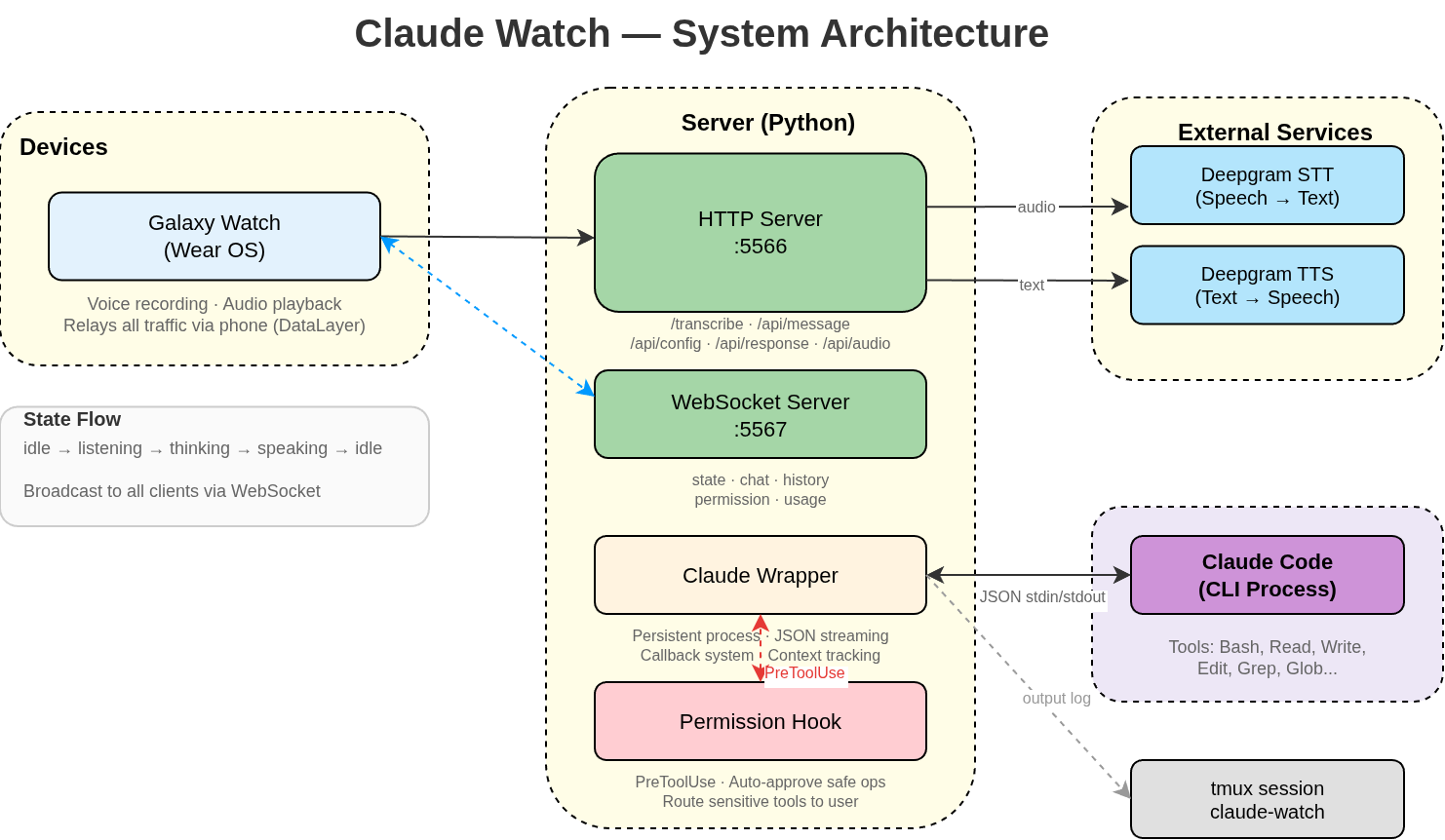
The architecture is not that complicated. There are a few moving parts, but each one does a simple job:
- Galaxy Watch - the client. It records audio, sends it to the server, and either displays text responses or plays back voice ones. It’s a Kotlin app running on Wear OS.
- Python server - runs locally on my machine. It receives audio from the watch, sends it over to Deepgram for transcription and text-to-speech, and talks to Claude.
- Deepgram - TTS, STT provider -
audio in > text out-text in > audio out - Claude Code - CLI process running on my machine. The wrapper script handles input sending, capturing output, and managing the process lifecycle. Before the wrapper I used a tmux get pane solution but it was unreliable as I was scraping data from the terminal. JSON-based approach is much cleaner.
- tmux session - the wrapper logs everything to a tmux session called
claude-watch. This gives me visibility into the way the Claude Code works - but more on the visibility later.
Why Wrapper?
Initially the project started with a simple crude stdin/stdout - but this became cumbersome and complex to maintain, plus very unreliable. Parsing the tmux pane output was problematic. I switched to reading JSONL session files instead + wrapper gives me ability to have a fully functional interactive session in tmux so I can just jump in from PC and check what is happening. There is also bi-directional connectivity - so messages from PC will also appear in the phone/watch.
Permission Hooks
One of the interesting things to solve was permission hooks. I wanted the watch to get the various permissions to be approved or not by the user so that I don’t have to come over to the PC to approve them.
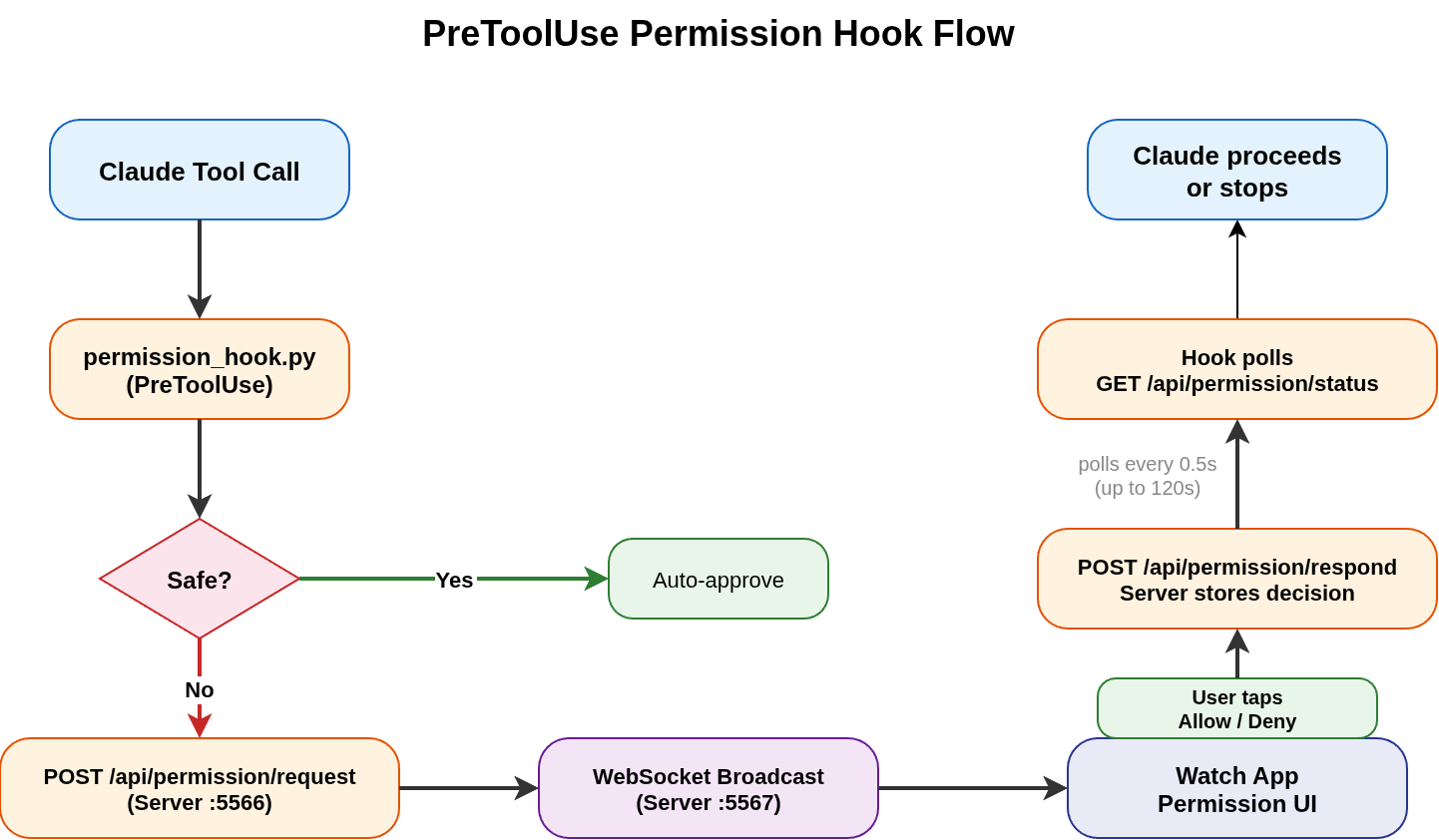
Claude Code has a hooks system - it enables registration of scripts that run before or after specific tool calls. I use a PreToolUse hook, which fires every time Claude tries to run a Bash command, write a file, or edit something. The hook is registered in .claude/settings.json and points to a Python script called permission_hook.py.
Here’s how the whole flow works - graphical flow below:
1. Hook intercepts the tool call
When Claude wants to use a tool like Bash or Write, the hook script receives the tool call details on stdin - the tool name, unique id etc. Then script checks if this is a safe operation, ls, cat, grep -> read-only commands get auto-approved.
2. Permission check sent over to server
Operations like writing files, running scripts, installing packages are sent as POST request to /api/permission/request. The request includes tool name, input, and the ID so the server knows which tool call it is.
3. Broadcasts to the watch
The server receives the permission request, assigns it a request_id, and pushes it out over WebSocket to the watch app. The app receives the message and a simple UI is displayed with a decision to Allow/Deny the request.
4. Hook waits for the response
The hook script in parallel is polling GET /api/permission/status/{request_id} every half second. Waiting for a decision/response from the user.
5. User clicks Allow or Deny
When I tap a button on the watch, the app sends POST /api/permission/respond with the request_id and the decision. The server stores it for polling hook to receive.
6. Polling hook gets the decision
On the next poll, the hook gets the decision, outputs the appropriate JSON response (allow or deny), and Claude Code either proceeds with the tool call or blocks it.
Server dashboard
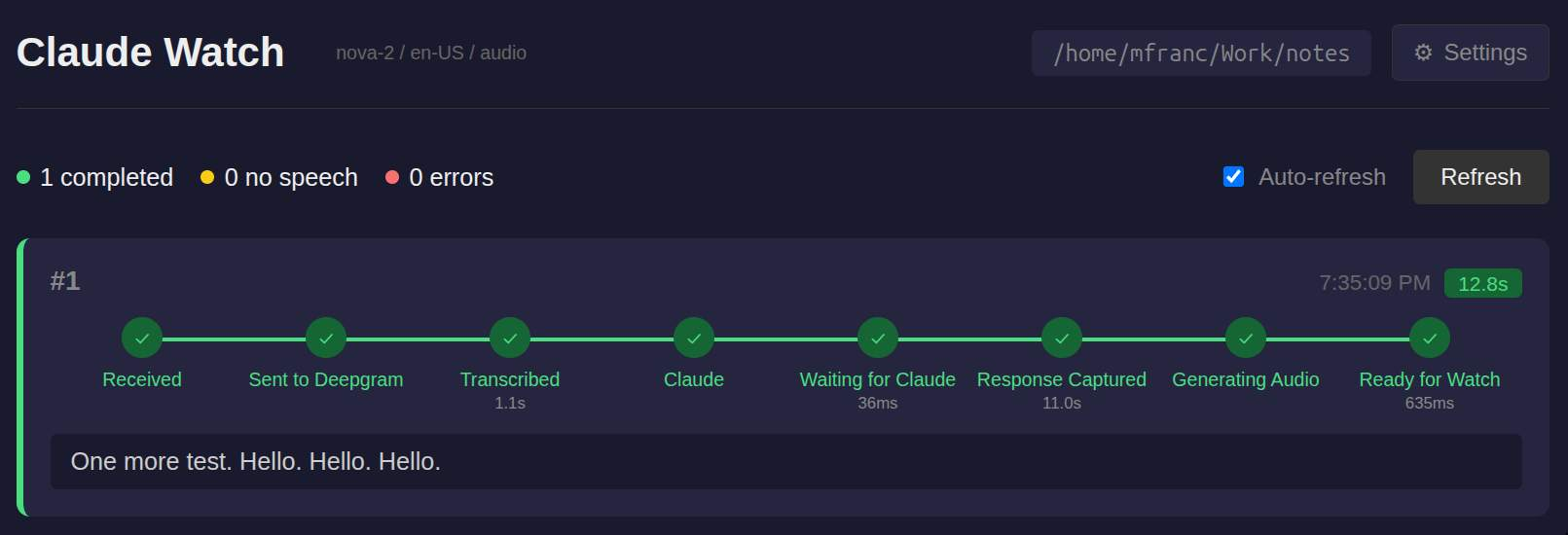
With watch and server, WebSockets, permissions hooks this setup gets more complicated than a simple dictation script. To better debug, understand problems or where the failures are I have also built a server dashboard. It contains a nice timeline with all the actions performed by the server (and timestamps) - it helps a lot.
Screenshot of the dashboard below. It also contains a settings page so I can change the language, type of model + in later versions I also added chat visualization to see the conversations flowing.
I have a watch … why not mobile phone?
With one client on the watch I was thinking… why not create then a mobile phone client? It has a lot more screen to use and maybe I could even add a bit of personality to the Claude process like give it a name and use it like a tamagotchi?
This is how toadie was born.
You can check visualization of the app - mockup below (created using Remotion and Claude because why not :) ). It is generally the same idea like a watch - another Kotlin app with chat, voice and text messages support. From the server point of view the client specifics are abstracted away.
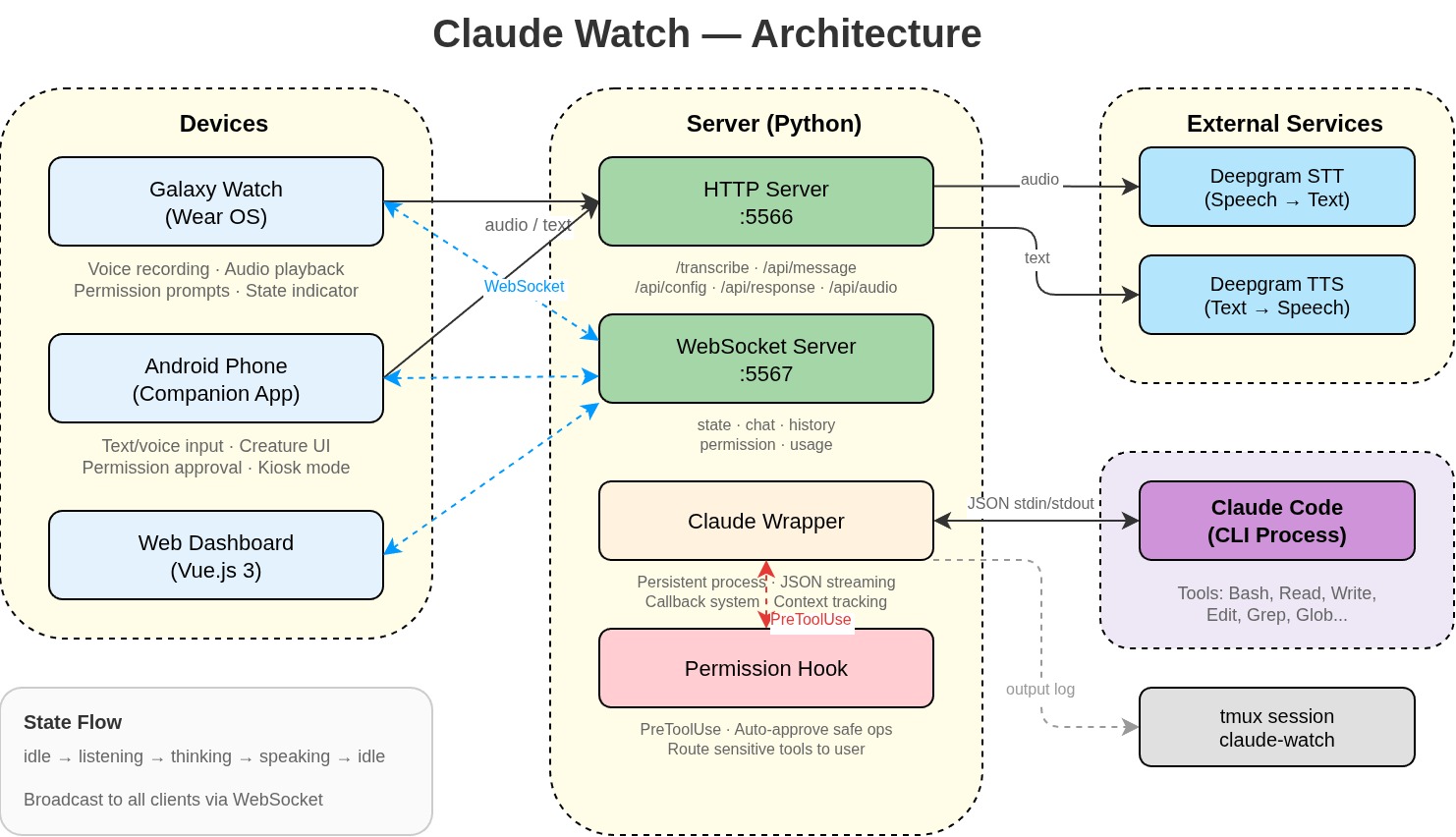
The Final Architecture
Adding the phone and dashboard to the diagram basically means adding two new clients. The web dashboard is also actually a client connected through WebSocket.
Private Access through Tailscale
In a nutshell, Tailscale enables your devices to pretend to be all in one private network even if they are all located in different places. This is done thanks to WireGuard (encryption tunnel) plus orchestration done by Tailscale: identity, key management, discovery is done out of the box, with a really good UX on top of it. It JUST works.
Each device gets an IP (100.x.x.x) but what is more interesting is that Tailscale uses a technique called UDP hole punching to get devices behind NAT (normally not available publicly) to talk to each other. If this doesn’t work then there is a DERP relay server involved.
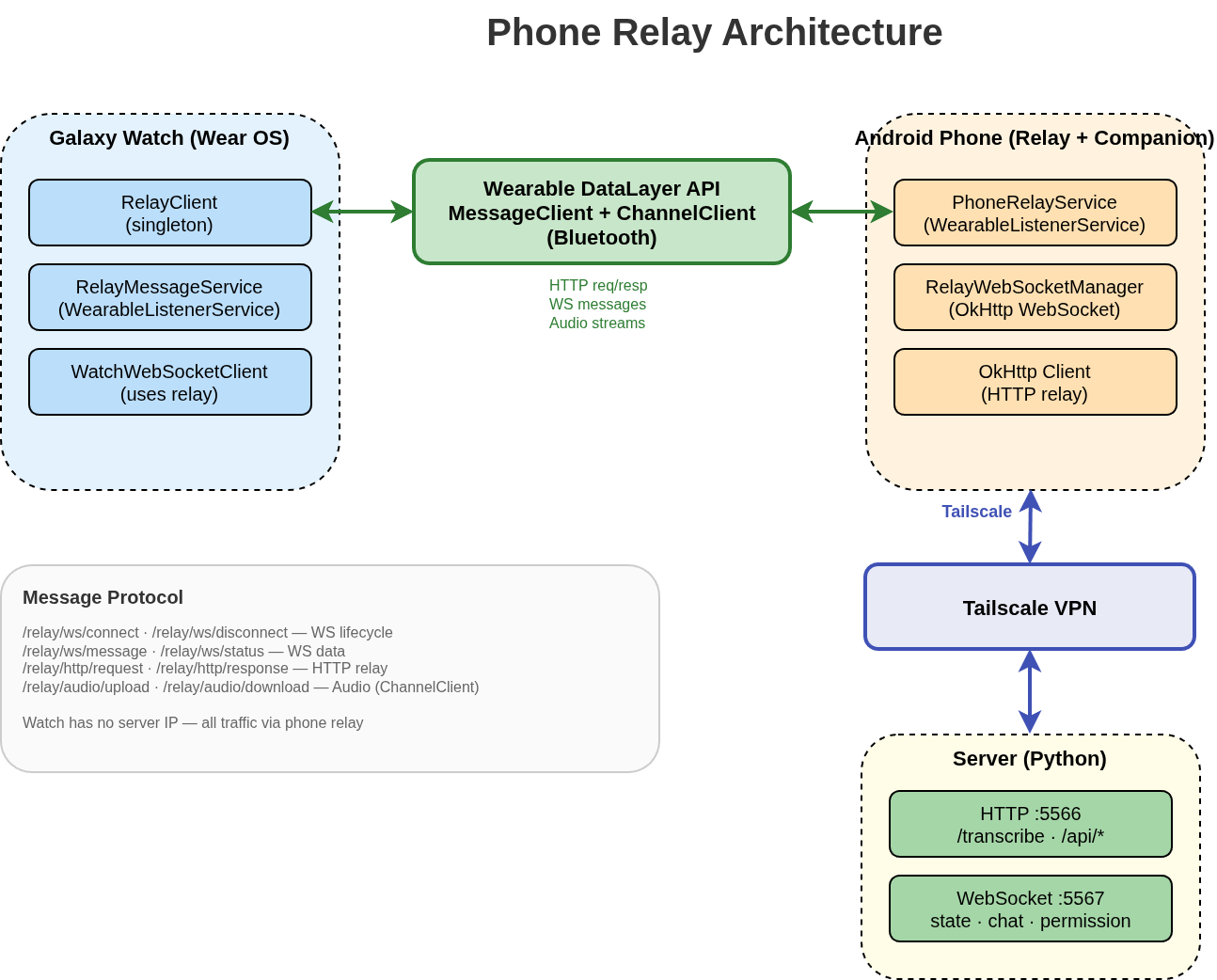
Problem on the watch - no Tailscale support
With Tailscale I faced another problem. Galaxy Watch doesn’t have support for Tailscale so how to get around this? I ended up with a solution to treat phone as relay. I don’t want to add another fancy d3 js animation to not make the post too heavy but the idea is simple, watch communicates with server through Tailscale thanks to the phone. Phone acts like a transparent proxy using Android Wearable DataLayer. There is a message protocol for signals to ensure the connection is stable. This enables Galaxy Watch to have much more reliable connections, doesn’t require it to be connected to public net and allows access to server through Tailscale.
Wake Word using Picovoice
Of course with such a setup I just couldn’t stop right… I thought why not just have the bot wake up on a wake word like Hey Siri. Here comes PicoVoice - it just works again and locally on the device, no need to call server (apart from key activation) - 1 wake word is for free. Amazing stuff. I can’t demo it but believe me that it works :)
This was also the WOW moment for me - as I realized that in 2-3 weeks I have built a truly functional piece of software with a great UX that I am using now every day. It is interesting and a bit frightening feeling on what a single person can build now with the available tools.
What can the bot do now?
- read my goals, todo list, calendar, email
- read all my 2nd brain notes
- manipulate my monitors (change inputs, brightness etc)
- turn on TV and run specific app on TV (I also have TV app with the BOT)
The bot kind of became a very very useful tool to access my notes - create plans, discuss ideas, write blog posts and do all kinds of stuff. At the moment I am planning to build also toadie as a manager of other bots so that I can tell the bot - hey work with the team on this repo - check GitHub issues and just work on them - it is 95% already doable I just need to wire things up.
Security?
You can read about it more here - security.md.
But there are multiple layers:
- public access to server is not exposed - thanks to Tailscale + WireGuard
- even if someone would get into my Tailscale network - server is configured to verify caller and has a list of peers for verification (uses whois to Tailscale to figure out if someone should be able to talk to it)
- Permission hooks - required for write + most sensitive reads - only approved clients can receive permission hooks
Why not ClawdBot?
I started building this before ClaudBot blew up in popularity. By the time I saw people sharing it everywhere, I already had my own thing going. And honestly, even after looking at what ClaudBot offers, I still prefer my setup.
It’s not that ClaudBot is bad. It solves real problems and has a solid set of integrations. But I want to run into those same problems myself and figure out my own solutions. That’s where the learning happens. If I just plug in someone else’s tool, I get the feature but I don’t understand the problem it’s solving. When I build it myself, I know exactly what’s going on under the hood, and I can fix or change anything without waiting on someone else’s roadmap.
My needs are also pretty specific. I want dictation from my watch. I want tmux integration. I want a weird Tamagotchi bot on my phone. No general-purpose tool is going to give me that exact combination. And the stuff I don’t need? I don’t want it in my stack adding complexity. I’d rather have a few scripts I fully understand than a feature-rich app where I use 20% of what it does.
There’s also the TOS issue. ClaudBot automates interactions with Claude in ways that go against Anthropic’s terms of service. I don’t know how strictly they enforce it, but I’d rather not build my workflow on top of something that could get shut down or have its access revoked at any point. My setup uses Claude Code CLI directly, which is an official tool from Anthropic, so I’m not worried about that.